
A budget spreadsheet UK households can actually stick to needs only five sections and three formulas. This guide shows you how to build one in Google Sheets or Excel, step by step, with a worked example on a £30,000 salary using 2026/27 tax rates and real UK bills. If you'd rather not build it yourself, our free budget template is ready to copy.
Foundations
Budget Spreadsheet UK: How to Make One
A budget spreadsheet UK guide: the 5 sections to include, the formulas to use and a worked £30k example with 2026/27 figures, plus a free template.
In this article
- 01Key takeaways
- 02What should a UK budget spreadsheet include?
- 03How do I make a budget spreadsheet step by step?
- 04Which formulas do you need in a budget spreadsheet?
- 05What does a UK budget spreadsheet look like? (£30k example)
- 06Should you use Google Sheets or Excel for a budget?
- 07How do you get your bank transactions into a spreadsheet?
- 08Is there a free budget spreadsheet template in the UK?
- 09FAQ
- 10The bottom line
Key takeaways
- Start from take-home pay, not salary. On £30,000 that's about £2,093 a month after Income Tax and NI in 2026/27, or £2,014 after a 5% workplace pension.
- Five sections cover almost everything: income, fixed bills, everyday spending, sinking funds and savings.
- One formula does most of the work: income minus all planned spending and saving. When it shows £0, every pound has a job.
- Use real UK costs: the average English council tax bill is £1,868 per dwelling in 2026-27 and the Ofgem price cap is £1,723 a year for a typical home (October to December 2026).
- Track actuals monthly: a second column of real spending shows where the plan and reality differ.
Want the spreadsheet to do the tax maths and plan the whole year for you? The UK Budget Planner is a ready-built Google Sheets planner for UK pay, bills and allowances.
What should a UK budget spreadsheet include?
A UK budget spreadsheet should include five sections: income, fixed bills, everyday spending, sinking funds and savings, each with a monthly total. Keep it to one sheet for the plan and one for tracking what you actually spend.
| Section | What goes in it | UK examples |
|---|---|---|
| Income | Money that lands in your account | Take-home pay, Child Benefit, side income |
| Fixed bills | Same amount every month | Rent or mortgage, council tax, energy, broadband, phone, insurance, TV licence |
| Everyday spending | Varies month to month | Food shop, travel, eating out, clothes, subscriptions |
| Sinking funds | Yearly or irregular costs saved monthly | Christmas, car service, MOT, holidays, birthdays |
| Savings and debt | Money for future you | Emergency fund, ISA, extra debt payments |
Sinking funds are the section most home-made spreadsheets miss. Without them, a £600 car insurance renewal or Christmas looks like an emergency, when it was always coming. Our Christmas budget guide shows how to plan this year's spending this way.
Take Action: Open a blank sheet and type these five headings down column A before you add any numbers.
How do I make a budget spreadsheet step by step?
You make a budget spreadsheet in six steps: set up columns, add take-home pay, list costs as monthly amounts, total each section, add a "left to allocate" cell, then track actual spending. It takes about 30 minutes with your last three bank statements to hand.
- Set up the columns. Column A for the category, B for the monthly budget, C for what you actually spent, D for the difference (=B-C).
- Add your take-home pay. Use the amount on your payslip after Income Tax, National Insurance, pension and student loan. If you're paid every four weeks, multiply one payment by 13 and divide by 12.
- List every cost as a monthly amount. Divide yearly bills by 12. A £600 annual insurance bill becomes £50 a month.
- Total each section. Put =SUM(B5:B14) (or whatever your range is) under each section, so you can see what bills or spending cost as a block.
- Add a "left to allocate" cell. Income minus every section total. Move anything left over into savings, debt or a sinking fund until it shows £0. This is the core of zero-based budgeting.
- Track actuals every month. Fill in column C from your bank app. Lines that go over budget are where to look first.
Not sure what your take-home pay is? The free UK budget calculator works it out from your salary with 2026/27 tax, NI, pension and student loan.
Which formulas do you need in a budget spreadsheet?
You only need three formulas for a working budget spreadsheet: =SUM for section totals, a subtraction for "left to allocate", and =SUMIF if you want to total spending by category. They work the same way in Google Sheets and Excel.
| Formula | What it does | Example |
|---|---|---|
| =SUM(range) | Adds up a section | =SUM(B5:B14) totals your fixed bills |
| =income - totals | Shows money not yet given a job | =B2-B15-B24-B30-B36 |
| =B-C | Over or under budget for each line | =B5-C5 (negative means you overspent) |
| =SUMIF(range, criteria, sum_range) | Totals transactions by category | =SUMIF(Transactions!C:C,"Food",Transactions!D:D) |
| =B/total | Share of income for a line | =B5/$B$2, formatted as a percentage |
Two small touches make the sheet easier to use:
- Conditional formatting: set the difference column to turn red when it's below 0, so overspends jump out.
- Data validation dropdowns: tag each line as Need, Want or Saving, then use =SUMIF on that column to check your split against the 50/30/20 rule.
Take Action: Add the "left to allocate" cell first. It's the one number that tells you whether your plan adds up.
What does a UK budget spreadsheet look like? (£30k example)
Here's a filled-in budget spreadsheet for a single person earning £30,000 and renting a £850 flat in England. Take-home pay is £2,014 a month after tax, NI and a 5% pension, and the "left to allocate" cell reaches £0.
The income line uses GOV.UK's 2026/27 Income Tax rates (£12,570 Personal Allowance, 20% basic rate) and the 2026 to 2027 employer rates and thresholds (8% employee NI above £12,570). That's £3,486 Income Tax and £1,394 NI a year, leaving £25,120, or £2,093 a month. The pension is the auto-enrolment minimum: 5% of earnings between £6,240 and £50,270, which costs about £79 a month after basic-rate tax relief.
The bills use official averages:
- Council tax: £1,868 average per dwelling in England for 2026-27 (MHCLG), or £117 a month with the 25% single person discount.
- Energy: £1,723 a year for a typical dual-fuel home on the Ofgem price cap from 1 October to 31 December 2026, about £144 a month.
- Food: £33.63 per person per week on food and non-alcoholic drinks for the home in DEFRA's Family Food FYE 2025, about £146 a month.
| Category | Section | Budget (£/month) | Share |
|---|---|---|---|
| Take-home pay | Income | 2,014 | 100% |
| Rent | Fixed bills | 850 | 42% |
| Council tax | Fixed bills | 117 | 6% |
| Energy | Fixed bills | 144 | 7% |
| Phone, broadband, water, insurance (example) | Fixed bills | 95 | 5% |
| Food shopping | Everyday | 146 | 7% |
| Travel (example) | Everyday | 100 | 5% |
| Spending money (eating out, clothes, subscriptions) | Everyday | 212 | 11% |
| Christmas, birthdays, car and holidays | Sinking funds | 100 | 5% |
| Emergency fund and ISA | Savings | 250 | 12% |
| Left to allocate | 0 |
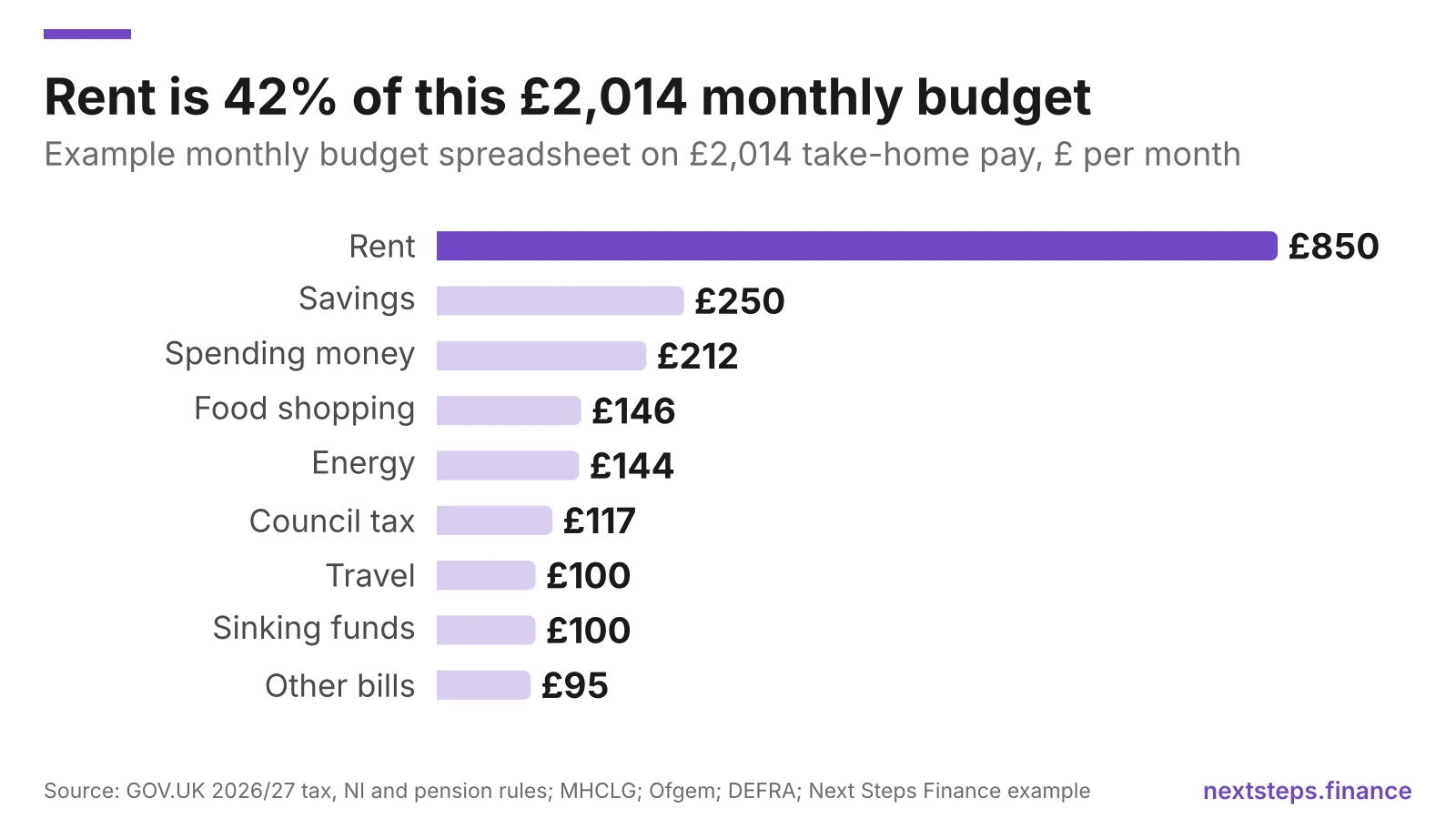
Travel and the "other bills" line vary too much to average, so swap in your own numbers. Our £30k salary budget post shows how the same income works if you share a flat or pay the UK average rent.
Take Action: Copy this table into row 1 of your sheet and overwrite each budget figure with your own from your bank statements.
Should you use Google Sheets or Excel for a budget?
Google Sheets suits most people because it's free with a Google account and works on your phone, so you can update it when you spend. Excel suits you if you already have Microsoft 365 or prefer working offline. The formulas in this guide work in both.
| Google Sheets | Excel | |
|---|---|---|
| Works on phone and laptop | Yes, syncs automatically | Yes, with Microsoft 365 and OneDrive |
| Share with a partner | Easy, by link or email | Via OneDrive |
| Formulas above | All work | All work |
| Best for | Couples, phone updates | Heavy users who like desktop tools |
If you're budgeting as a couple, a shared Google Sheet means you're both looking at the same numbers. If one of you uses Excel, you can download a Google Sheet as an Excel file (File, then Download).
How do you get your bank transactions into a spreadsheet?
You can type transactions in by hand, download a statement from your bank's app or online banking, or use a budgeting app that exports them for you. Typing in totals once a week is often enough: you don't need every coffee.
Many banks let you download statements from online banking, sometimes as a CSV file you can paste into a "Transactions" tab. Then a =SUMIF formula totals each category for your "actual" column.
If you have accounts at several banks, a budgeting app can pull them into one place through Open Banking. The Emma budgeting app can do this in two ways, according to its help centre:
- Manual export: download an Excel (.xlsx) file of your transactions for the accounts and dates you choose.
- Live Export: a Google Sheet that updates automatically as the app syncs new transactions.
Both are only on Emma Pro and Ultimate, not the free Basic plan or Plus. Emma's plan page lists Pro at £9.99 a month or £83.99 a year, with a 7-day free trial. If you move back to Basic, the Live Export sheet stops updating.
| Option | Cost | Who it may suit |
|---|---|---|
| Type in weekly totals | Free | Most people, one bank account |
| Bank statement download | Free | Comfortable copying and pasting |
| Emma Pro Live Export | £9.99/month or £83.99/year | Several accounts, want it automatic |
| UK Budget Planner | £14.99 one-off | Want a ready-built UK plan, no bank access |
Paying £84 a year to fill in a free spreadsheet only makes sense if it saves you real time. Our best budgeting apps UK round-up compares free alternatives.
Is there a free budget spreadsheet template in the UK?
Yes. Our free UK budget template for Google Sheets has UK spending categories, a 50/30/20 check, a "left to allocate" cell and a 12-month tracker. Enter your email, confirm it, and make your own copy.
If you want more, the paid UK Budget Planner adds a take-home pay calculator (tax, NI, student loans, pension and Scottish rates), a budget that balances to £0 automatically, a tick-box monthly tracker, a five-year savings forecast and ISA and pension allowance tracking, for a one-off £14.99.
For context on what normal looks like, the ONS says average UK household spending was £676.60 a week in the year to March 2025, with housing, fuel and power the biggest share at 18% and transport next at 14%.
FAQ
How do I create a simple budget spreadsheet?
List your monthly take-home pay in one cell, then your costs in rows below, grouped into bills, everyday spending, sinking funds and savings. Use =SUM to total each group and one cell that takes every total away from income. Adjust the numbers until that cell shows £0, then track what you actually spend each month.
What are the main categories in a budget spreadsheet?
The main categories are income, fixed bills (rent or mortgage, council tax, energy, broadband, insurance), everyday spending (food, travel, eating out), sinking funds for yearly costs like Christmas and car repairs, and savings and debt payments. Five sections are enough for most UK households. Add sub-lines within them rather than more sections.
Is Google Sheets good for budgeting?
Google Sheets works well for budgeting. It's free with a Google account, saves automatically, works on a phone and can be shared with a partner. Simple formulas like =SUM and =SUMIF handle everything a household budget needs. A ready-made template saves setting it up yourself, and you can download your copy as an Excel file.
Should I budget using gross or net income?
Budget using net income, the take-home pay that reaches your bank after Income Tax, National Insurance, pension and student loan. On a £30,000 salary in 2026/27 that's about £2,014 a month after a 5% pension, against £2,500 gross. Budgeting from gross pay overstates what you can spend by almost £500 a month.
How often should I update my budget spreadsheet?
Update your spending once a week and review the whole budget once a month, ideally on payday. Weekly updates take about ten minutes and stop surprises building up. The monthly review is when you move leftover money to savings, adjust lines you keep overspending on, and set aside money for upcoming yearly bills.
The bottom line
A budget spreadsheet doesn't need to be clever. Five sections, three formulas and a "left to allocate" cell that reaches £0 will do more than most apps, as long as you start from your real take-home pay and include sinking funds for the costs that come once a year.
Build your own with the steps above, start from the free budget template, or use the UK Budget Planner if you'd like the take-home pay maths and a full-year plan done for you. For the bigger picture, read our complete guide to budgeting in the UK or browse the budgeting hub.
Found this useful? Add Next Steps Finance as a preferred source and Google will show you more of our guides in search and AI answers.
Put this into practice
Build your budget in one sitting
The UK Budget Planner works out your take-home pay, splits it with the 50/30/20 rule, tracks spending through the year and forecasts five years ahead. Made for UK pay, tax and bills.