
Budgeting apps connect to your bank accounts through Open Banking, sort every transaction into categories and tell you where your money actually goes. The three big UK names, Emma, Snoop and Plum, all do this for free, but they're built for different people. I've checked each app's current plans and prices today, 27 October 2026, the day before Chancellor John Healey's Autumn Budget, which is a good moment to get a clear picture of your own spending before any tax changes land.
Key takeaways
- Emma, Snoop and Plum are all free to download and connect to your UK bank accounts using FCA-regulated Open Banking, which gives them read-only access.
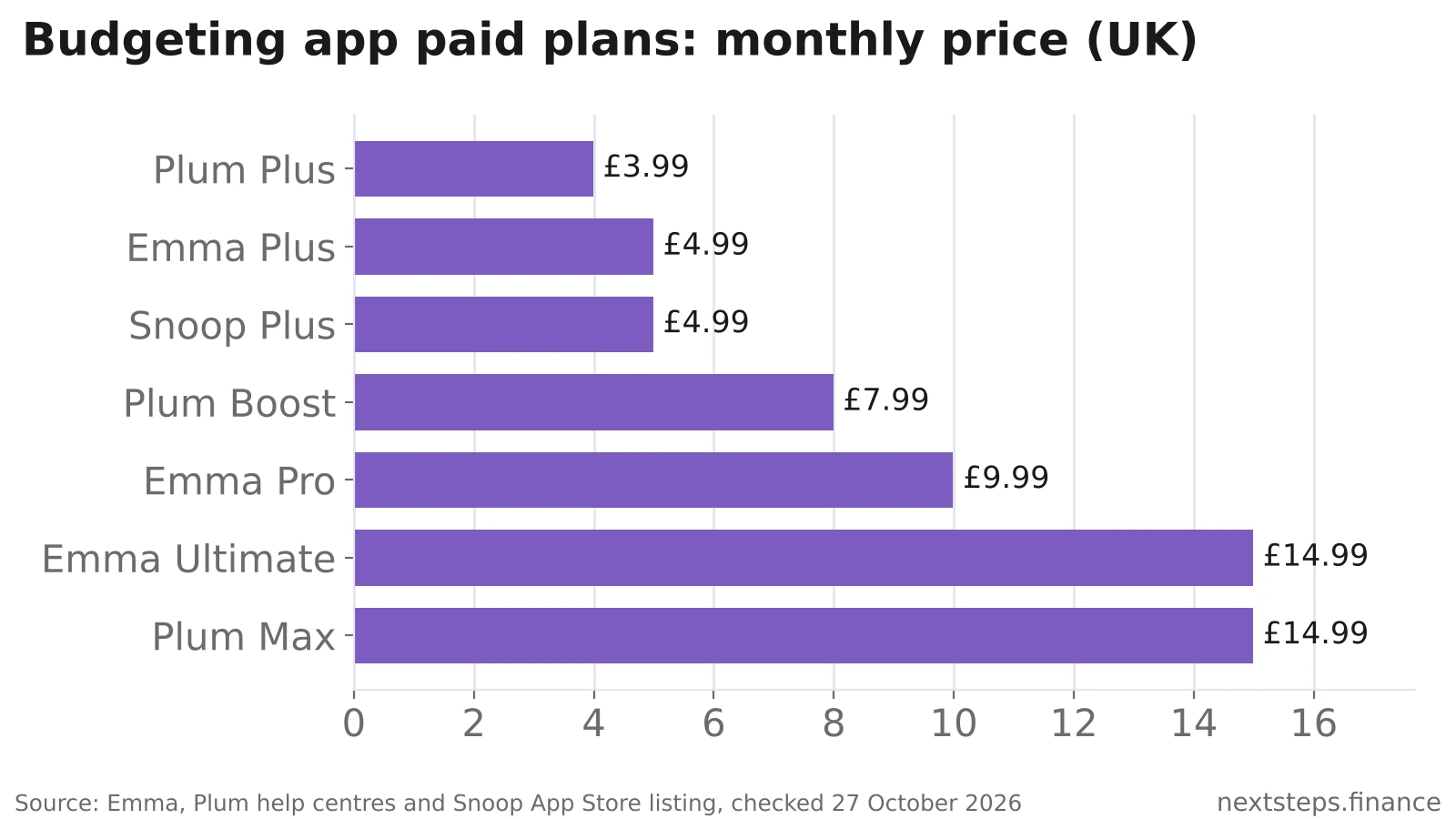
- Emma's paid plans cost £4.99, £9.99 or £14.99 a month (Plus, Pro, Ultimate), or £41.99, £83.99 or £124.99 a year, according to Emma's help centre.
- Snoop Plus costs £4.99 a month and adds unlimited custom categories, spending targets with alerts and net worth tracking.
- Plum's new plans cost £3.99, £7.99 or £14.99 a month (Plus, Boost, Max), and full spending tracking needs Boost or Max.
- The average UK household spent £676.60 a week in the year to March 2025, ONS figures show, so even a 5% saving from tracking spending is worth over £1,700 a year.
What is the best budgeting app in the UK?
There's no single best budgeting app; the right one depends on whether you want to track, cut or save. Emma is the strongest pure budgeting and tracking app, Snoop is best for spotting bill rises and cheaper deals, and Plum is best if you'd rather an app moved money into savings automatically.
| App | Best for | Free version | Paid plans (monthly) | Key condition | Link |
|---|---|---|---|---|---|
| Emma | Detailed tracking across many accounts | Yes | Plus £4.99, Pro £9.99, Ultimate £14.99 | Plus allows 4 bank logins; Pro and Ultimate unlimited | Emma budgeting app |
| Snoop | Cutting bills and subscriptions | Yes | Snoop Plus £4.99 | Custom categories and net worth need Plus | Snoop app |
| Plum | Automatic saving and investing | Yes (Basic) | Plus £3.99, Boost £7.99, Max £14.99 | Full spend tracker only on Boost and Max | Plum savings app |
| Your bank's app | Simple tracking of one account | Yes | None | Usually only sees that bank's accounts | Monzo, Starling and others |
| Spreadsheet | Full control, no bank access | Yes | None | Manual entry | UK Budget Planner |
Take Action: Pick the app that matches your main goal (track, cut or save), use the free version for a full month, and only then decide whether a paid plan is worth it.
Emma review: best for tracking every account in one place
Emma suits people with several bank accounts, credit cards and investments who want one dashboard for all of them. It rates 4.7 out of 5 from around 27,000 ratings on the UK App Store, and its App Store listing describes unlimited budgets with custom categories, rolling budgets and budgets synced to your pay cycle.
Emma has a free version and three paid tiers. Prices, from Emma's help centre (updated 15 September 2026):
| Emma plan | Monthly | Annual | Main extras |
|---|---|---|---|
| Plus | £4.99 | £41.99 | 4 bank logins, cashback offers, rent reporting to Experian |
| Pro | £9.99 | £83.99 | Unlimited bank logins, custom categories, net worth, CSV import and export, rent reporting to all three credit agencies |
| Ultimate | £14.99 | £124.99 | Everything in Pro plus business accounts and Spaces |
The features come from Emma's plan comparison. Paying annually works out about 30% cheaper than monthly.
Downsides: custom categories, which most serious budgeters want, need Pro at £9.99 a month. Emma also offers investing in US shares; that's a separate product, and with investing your capital is at risk.
Regulation: Emma Technologies Ltd is registered with the FCA under the Payment Services Regulations 2017 (FRN 794952) and authorised for investment and consumer credit activities (FRN 1042167).
This may suit you if you juggle several accounts and want everything in one place. You can sign up to Emma and start on the free version.
Snoop review: best free app for cutting bills
Snoop is the budgeting app most focused on helping you spend less. Its free version connects your accounts, sets a monthly budget, finds subscriptions you can cancel, sends daily balance alerts and weekly spending reports, and warns you if a bill might push you into your overdraft.
Snoop also looks at your spending to spot price rises on bills, suggest when to switch suppliers and show vouchers for places you already shop. For many people, that alone pays for the time it takes to set up.
Snoop Plus costs £4.99 a month, according to its App Store listing, and adds:
- unlimited custom spending categories
- spending targets with alerts
- manually added accounts and a net worth figure
- custom spending reports
There's also an annual option. Snoop quotes different annual prices in different places (£31.99 in its App Store description, £39.99 in a staff reply on its forum), so check the price in the app before you pay.
Downsides: deal suggestions are a starting point, not a full market search, so compare with an independent comparison site before you switch. Budgeting features beyond the basics need Plus.
Regulation: Usnoop Limited is registered with the FCA under the Payment Services Regulations 2017 (firm registration number 911638).
This may suit you if your goal is to cut bills rather than to build a detailed budget. You can download the Snoop app for free.
Plum review: best for saving automatically
Plum is a saving and investing app first and a budgeting app second. Its algorithm and rules (round-ups, payday transfers, weekly amounts and challenges like the 52-week challenge) move small sums into savings without you having to think about it.
Plum's current UK plans, from its plan comparison table:
| Plum plan | Monthly | Annual | Spend tracker | Easy access rate (variable) |
|---|---|---|---|---|
| Basic | Free | Free | Limited | 3.00% |
| Plus | £3.99 | £39 | Limited | 3.00% |
| Boost | £7.99 | £75 | Full | 3.20% |
| Max | £14.99 | £135 | Full | 3.63% |
Downsides: for budgeting specifically, Plum is weaker than Emma or Snoop unless you pay for Boost or Max. Its "Plum Interest" pocket is a money market fund, not a savings account, and Plum's investing products are investments: capital at risk, and the value can fall. Your Primary Pocket is e-money held with Modulr, so it's safeguarded but not covered by the FSCS.
Protection: Plum says its Cash ISA money is held with Citibank and Lloyds Bank and is covered by the FSCS up to £120,000 per person per bank, according to Plum's protection page.
This may suit you if you find it hard to save and want it automated. You can sign up to Plum and start on Basic for free.
Are budgeting apps safe to use in the UK?
Yes, mainstream UK budgeting apps are generally safe, because they connect through Open Banking and must be registered with the FCA. Open Banking gives an app read-only access to your transactions; it can't move money out of your bank account unless you separately set up a payment.
A few sensible checks before you connect anything:
- Search the app's firm name on the FCA register and check it's registered or authorised.
- Connect through the official Open Banking screen in your banking app. Never type your bank password into a budgeting app.
- Know what isn't FSCS protected. Money held as e-money or in investment funds isn't covered in the same way as a bank savings account.
- Remove access you no longer use, in the app and in your bank's connected apps settings.
Take Action: Check the FCA register entry for any app before linking your bank account. It takes less than a minute.
Is a free budgeting app good enough?
For most people, yes. The free versions of Emma and Snoop, or your own bank's spending insights, cover the core job: seeing where your money goes each month. Paid plans mainly add custom categories, more account connections, net worth tracking and exports.
A paid plan is worth it only if it changes your behaviour by more than it costs. Emma Pro at £83.99 a year needs to save you about £7 a month to break even. With UK unsecured debt averaging £4,511 per adult in May 2026, according to The Money Charity, many people will get more from putting £7 a month towards debt than from a subscription.
Prefer no bank connection at all? A spreadsheet works just as well if you'll update it. Our UK Budget Planner is a ready-made sheet built around UK pay, tax and bills, and MoneyHelper's budget planner is a free, impartial online option.
How to choose and set up a budgeting app
Choose your app by your main goal, then give it a month before judging it. Here's a simple process:
- Decide your goal: track (Emma), cut bills (Snoop) or save automatically (Plum).
- Download the free version and connect your main current account and credit cards.
- Fix the categories for the first two weeks. Apps miscategorise some transactions, and correcting them is what makes the reports useful.
- Set two or three budgets only, for the categories where you overspend, such as eating out, groceries and shopping.
- Review after one month. If you've used a paid feature regularly, upgrade (annual plans are cheaper); if not, stay free.
If you're new to budgeting, read our complete guide to budgeting in the UK for methods such as 50/30/20 and zero-based budgeting, then use the app to stick to your chosen method. Building an emergency fund is usually the first goal to set. If you also want to earn back some of what you spend, see our guide to the best cashback apps.
Frequently asked questions
What is the best free budgeting app UK?
Snoop and Emma are the strongest free budgeting apps in the UK in 2026. Snoop's free version includes a budget planner, a subscription tracker, daily balance alerts, weekly reports and bill-rise warnings. Emma's free version gives you one dashboard for your accounts. Your bank's app may also have free spending insights.
Is Emma or Snoop better?
Emma is better for detailed tracking across many accounts, especially on Pro (£9.99 a month), which adds unlimited bank logins and custom categories. Snoop is better for cutting bills, because its free version flags price rises, unused subscriptions and better deals. Both have free versions, so you can try each for a month.
Are budgeting apps safe UK?
Mainstream UK budgeting apps such as Emma, Snoop and Plum are registered with the FCA and connect through Open Banking, which gives read-only access to your transactions. They can't take money from your bank account. Check the firm on the FCA register and never share your bank login details directly.
How much does Emma cost per month?
Emma has a free version. Its paid plans cost £4.99 a month for Plus, £9.99 for Pro and £14.99 for Ultimate, according to Emma's help centre in September 2026. Paying annually costs £41.99, £83.99 or £124.99, which works out about 30% cheaper than paying monthly.
Is Plum a budgeting app?
Plum is mainly an automatic saving and investing app, with budgeting as a secondary feature. Its spend tracker is limited on the free Basic and £3.99 Plus plans and full on Boost (£7.99) and Max (£14.99). If budgeting is your main goal, Emma or Snoop may suit you better, with Plum for saving.
Do budgeting apps affect your credit score?
No. Connecting a budgeting app through Open Banking doesn't leave a mark on your credit file or affect your score. Some apps, including Emma, let you report rent payments to credit reference agencies, which may help build your credit history. Checking your own score through an app is a soft search that lenders can't see.
The bottom line
Start with a free app that matches your goal: Emma to track everything, Snoop to cut bills, or Plum to save without thinking. Most people never need to pay. If you'd like a qualified second opinion on your budget, debts and savings plan, book a personal finance review.