If you run a small business, record keeping is the difference between being able to explain your figures and trying to reconstruct a year of transactions in January. This sole trader record keeping UK checklist covers what to log, what evidence to retain, how to organise it and the record-retention deadline.
It is written for sole traders using Self Assessment. Partnerships, limited companies, VAT-registered businesses and people required to use Making Tax Digital may have additional requirements.
Key takeaways
- Keep a record of every business sale, receipt, expense and relevant supporting document.
- HMRC does not normally ask you to upload receipts with your Self Assessment return, but you must be able to show your records if asked.
- For an online return filed on time, records must normally be kept for five years after the 31 January filing deadline.
- Reconcile your records to bank statements, invoices and payment-platform reports regularly rather than waiting until the tax return is due.
- A spreadsheet can organise transactions, but it is not automatically Making Tax Digital-compatible software.
What records must a sole trader keep for HMRC?
You need records of all business income and expenses, and enough supporting evidence to work out your profit or loss accurately. HMRC's list also covers records of your personal income, VAT records if you're VAT-registered, PAYE records if you employ people, and any Self-Employment Income Support Scheme grants you claimed. HMRC says your records must be accurate.
A practical checklist is:
| Record | Examples |
|---|---|
| Sales and income | Sales invoices, cash takings, till records, payment confirmations, platform statements and refunds |
| Business purchases | Supplier invoices, receipts, stock or materials, tools and equipment |
| Operating expenses | Travel, mileage, software, insurance, advertising, phone and office costs |
| Bank and payment records | Bank statements, card statements, PayPal or other payment-provider statements |
| Personal income | PAYE payslips, interest, dividends or other figures needed for Self Assessment |
| Extra records, if relevant | VAT, payroll, SEISS grants; under traditional accounting, money owed to you, bills not yet paid, and year-end stock and work in progress |
The records must be accurate and allow you to identify business transactions. HMRC's record-keeping guidance and list of evidence to keep are the authoritative starting points.
HMRC says you do not need to send your records in with your tax return, but you must keep them so you can work out your profit or loss and show them to HMRC if asked.
What proof should I keep for each income and expense?
A transaction entry and its supporting evidence are two different things. Your spreadsheet or bookkeeping system summarises the transaction; the receipt, invoice, statement or other document helps prove it happened.
For each transaction, aim to record:
- Date received or paid.
- Amount and currency.
- Who paid you or who you paid.
- What the transaction was for.
- Category, such as sales, materials, travel or software.
- Payment method or account.
- A reference to the supporting document.
- Business-use percentage, where an item is used partly for personal purposes.
For example, a £120 software subscription could be recorded in your expense log with the date, supplier, amount, category and a reference such as 2026-11-software-004. Save the invoice or receipt with that reference so you can find it later.
For travel, keep enough detail to explain the journey, including its date, destination, business purpose and mileage if you are claiming mileage. For mixed-use purchases, keep your calculation showing how you worked out the business share. Our working-from-home expenses guide explains the records needed for the simplified and actual-cost methods.
Sole trader record keeping UK: how should I organise it?
The best system is one you can maintain and retrieve from. You can use paper, folders, spreadsheets or bookkeeping software if it meets your obligations, but avoid having receipts scattered across email, downloads and your phone.
One simple digital folder structure is:
- Income: invoices, receipts, cash-sales records and payment-provider statements.
- Expenses: receipts and supplier invoices, grouped by category or month.
- Bank: statements and reconciliation notes.
- Travel and home: mileage logs, homeworking hours and business-use calculations.
- Tax: submitted returns, HMRC statements, payment confirmations and tax calculations.
- Assets and other records: equipment purchases, stock, work in progress or other records relevant to your accounting method.
Use a consistent filename, for example 2026-11-18-client-invoice-014.pdf or 2026-11-18-train-receipt.pdf. The goal is to find a document quickly and connect it to the transaction in your records.
HMRC's record-keeping guidance does not require a separate business bank account, but separating business transactions can make reconciliation much easier. If you use a personal account, make sure you can clearly identify business activity.
How often should I reconcile income and expenses?
A weekly or monthly review is usually easier than a year-end catch-up. Reconciliation means checking that your transaction log agrees with the evidence and the money that actually moved.
A simple monthly routine:
- Add any missing invoices, sales, refunds and expenses.
- Compare the entries with bank and card statements.
- Match payment-platform payouts to the underlying sales and fees, rather than treating a net payout as the full sales figure.
- Check that receipts and invoices are saved and referenced.
- Review unusual, duplicate or mixed-use transactions.
- Back up the records and keep a note of any unresolved item.
Here is an illustrative month, not a real business or tax calculation:
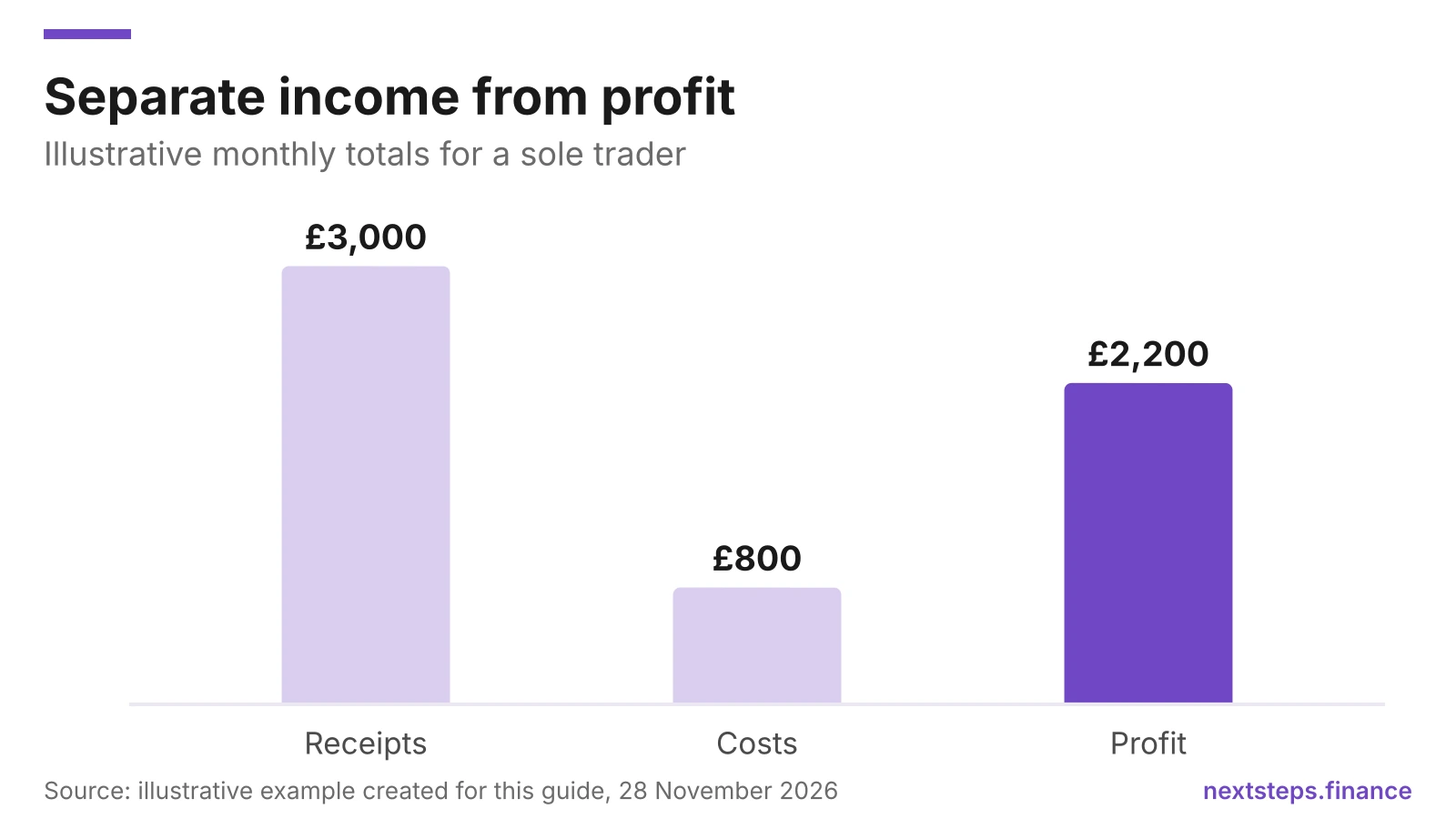
The example shows why it is useful to record income and costs separately: £3,000 of receipts is not the same as £3,000 of profit, and a tax estimate needs the underlying figures.
A structured spreadsheet can make the routine easier to follow, but free spreadsheets, paper records or bookkeeping software may work just as well for a simple business. The important thing is to keep a reliable audit trail. Once the monthly figures are reliable, our self-employed budget guide shows how to plan around uneven income.
How long must I keep sole trader records?
For a Self Assessment return filed online on time, HMRC says you must normally keep your records for at least five years after the 31 January submission deadline for that tax year.
| Tax year | Online filing deadline | Keep records until at least |
|---|---|---|
| 2024/25 | 31 January 2026 | 31 January 2031 |
| 2025/26 | 31 January 2027 | 31 January 2032 |
| 2026/27 | 31 January 2028 | 31 January 2033 |
These are the usual minimum dates for returns sent by the deadline. HMRC's own example: a 2022/23 return sent online by 31 January 2024 means keeping records until at least the end of January 2029. HMRC gives a different rule for very late returns: if you send a return more than four years after its deadline, you must keep records for 15 months after sending it. If HMRC is checking a return when your retention date arrives, it is sensible to hold on to those records until the check is finished.
See HMRC's record-retention guidance before deleting anything. A practical approach is to label each year's folder with its retention date and review it only when that date has passed and nothing about that year is still open with HMRC.
Do sole traders need digital records for Making Tax Digital?
Some sole traders must now use software compatible with Making Tax Digital for Income Tax (MTD), which creates digital records and sends quarterly updates to HMRC. This is a separate requirement from simply keeping a spreadsheet of transactions.
The start dates depend on your qualifying income: HMRC defines it as your total self-employment and property income before expenses (turnover), taken from the Self Assessment return for the tax year shown. Employment income, dividends and pensions don't count.
| Qualifying income | MTD start |
|---|---|
| Over £50,000, based on 2024/25 | 6 April 2026 |
| Over £30,000, based on 2025/26 | 6 April 2027 |
| Over £20,000, based on 2026/27 | 6 April 2028 |
If MTD applies to you, HMRC says you need compatible software to create, store and correct digital records of your self-employment and property income and expenses, send quarterly updates (summaries, not tax returns) and submit your tax return by 31 January. If you keep records in a spreadsheet, so-called bridging software can connect to it and make the submissions. You can use more than one product, but only one product for each separate submission, and they must work together. Check when to sign up and HMRC's guide to choosing the right software before choosing a system.
A planning spreadsheet on its own is not MTD software and does not submit anything to HMRC. If you are required to use MTD, choose compatible software, or bridging software that works with your spreadsheet. Our digital tax rules guide covers the wider change.
What is a simple record-keeping workflow for a sole trader?
Start with a system that captures the transaction and its evidence together, then review it regularly. You do not need to buy software if a free system already meets your needs and you are not required to use MTD-compatible software.
If you want income, expenses, mileage and a provisional tax estimate in one place, the UK Self-Employed Tax Tracker is a Google Sheets option. It has connected income, expense and Mileage & Home logs, 15 HMRC-matched expense categories, a tax estimate and a Tax Return Summary arranged around the self-employment return headings.